Introduction
As more organisations adopt Azure for hosting applications and services, ensuring secure network connectivity become a key requirement. Azure Private Endpoints provide a secure way to access Azure services such as Storage Accounts, SQL Databases, and Key Vaults over the Azure backbone network, without exposing traffic to the public internet.
Once a service is connected through a Private Endpoint, clients still need a mechanism to resolve the service name to its private IP address. Azure Private DNS Zone helps achieve this by providing private DNS resolution within Azure Virtual Networks.
In this article, we will explore Azure Private DNS Zone, understand how they integrate with Private Endpoints, and learn how Azure resolves service names to private IP addresses behind the scenes.
What is a Private DNS Zone?
Azure Private DNS Zone is a DNS service that enables name resolution within Azure Virtual Networks without exposing DNS records to the public internet.
Unlike Public DNS Zone, which resolve publicly accessible domain names, Private DNS Zone is accessible only from the Azure Virtual Networks that are linked to them.
Example :
Storage Account Name :
mystorage.blob.core.windows.netPublic Resolution :
52.123.98.72 (Public IP)Private Endpoint Resolution :
10.0.1.4 (Private IP)When a Private Endpoint is configured for the Storage Account, Azure Private DNS Zone ensures that resources within the linked Virtual Network resolve the storage account name to its private IP address instead of the public IP address. This allows traffic to remain within the Azure backbone network, improving both security and network isolation.
Why do we need Private DNS Zone?
Without a Private DNS Zone, applications will continue to resolve Azure services to their public IP addresses.
Azure Private DNS Zone addresses this issue by mapping service names to the corresponding Private Endpoint IP addresses, ensuring that traffic remains within the Azure network.
Important: DNS records are created automatically only when the Private Endpoint is integrated with a Private DNS Zone, and the required permissions are available. If a Private DNS Zone is not configured or automatic DNS registration is not enabled, the DNS records must be created manually.
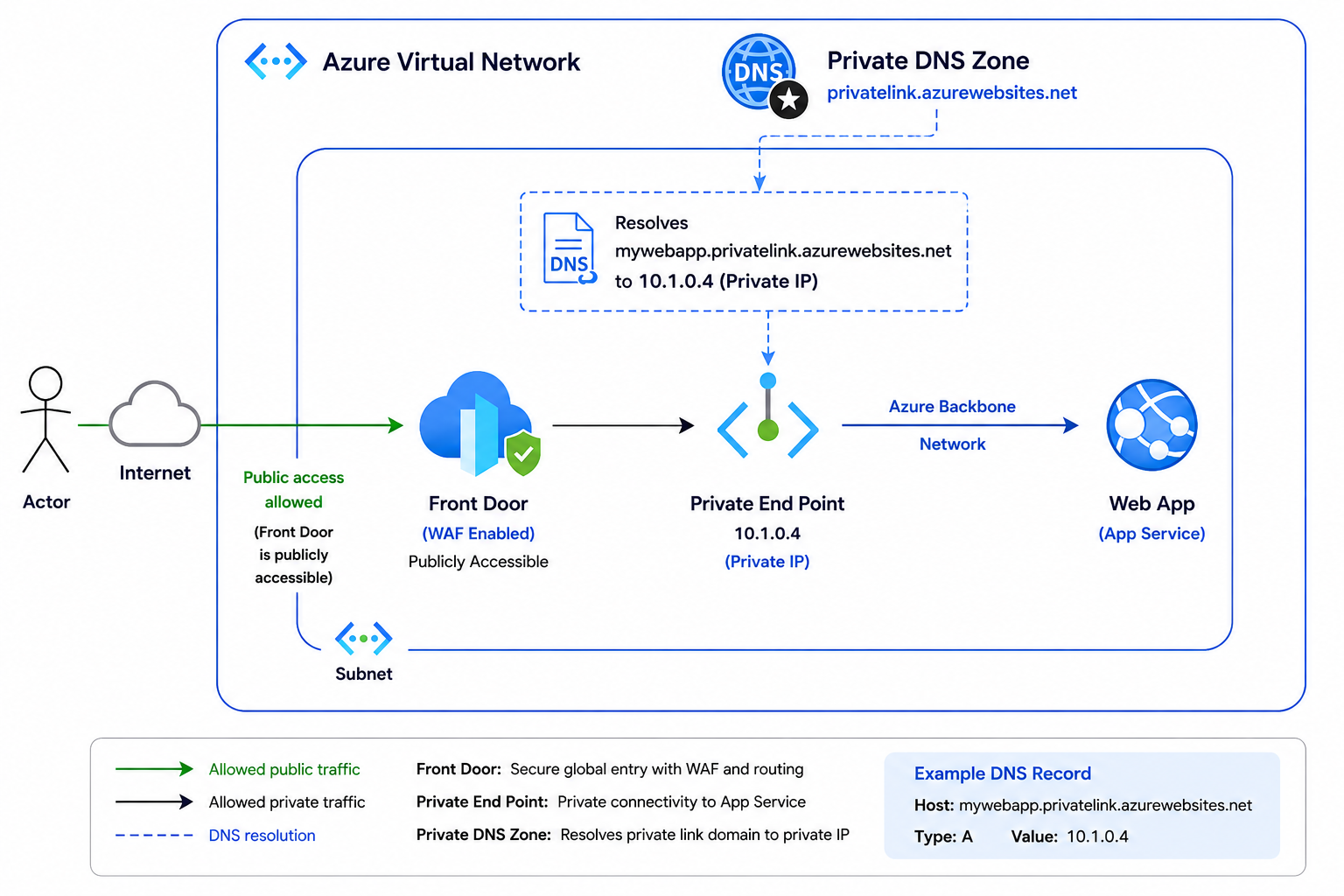
Application Flow Diagram
Creating a Private DNS Zone
- In the Azure portal, search for Private DNS Zone
- Click Create.
- Enter Zone Name
- Create the Zone.
- Link it to the Virtual Network.
Example :
privatelink.azurewebsites.net| Hostname | Private IP |
|---|---|
| mywebapp.privatelink.azurewebsites.net | 10.1.0.4 |
How Name Resolution Works
As shown in the diagram below, when Azure Front Door attempts to access a Web App, Azure performs the following steps:
- Azure Front Door sends a DNS request.
- Azure DNS checks the Private DNS Zone.
- A matching DNS record is found.
- Azure returns the Private Endpoint IP address.
- Traffic flows entirely through the Azure backbone network.
NSLookup
When you execute the nslookup command, it should return the private IP address associated with Private Endpoint.
Example :
nslookup mywebapp.privatelink.azurewebsites.netExpected Output :
10.1.0.4Conclusion
Azure Private DNS Zone is a critical component of secure Azure networking. They ensure that Azure services exposed through Private Endpoints are resolved to private IP addresses rather than public endpoints.
By combining Private Endpoints, Private Link, and Private DNS Zone, organizations can build secure, scalable, and private cloud architectures while maintaining seamless connectivity for applications and users.
No comments found.